What Is n8n? Uses, Pricing and Installation


Bakslash editorial
September 26, 2026
Comparte este artículo
n8n is a workflow automation platform. It connects apps, databases and AI models in a visual editor, so a task runs on its own when something happens: an email arrives, someone fills in a form or a scheduled time comes around. You can use it on n8n's cloud or install it on your own server.
What n8n is used for
With n8n you take repetitive tasks that follow the same steps every time off your team's plate. Common business uses:
- Customer service: collect requests that arrive by email, chat or forms, sort them with AI and route them to the right person.
- Documents: read invoices or contracts that arrive by email, pull out the key data and record it in your ERP or a spreadsheet.
- Reporting: gather data from your CRM, website and databases, and send a summary to the people who need it every Monday.
- Sales and marketing: receive a lead, enrich its data, score it and alert a sales rep or start a follow-up sequence.
How n8n works
Each automation in n8n is a workflow made of connected nodes:
- Trigger: the event that starts the workflow. It can be a form, a message, a webhook or a time of day.
- Action nodes: each one handles a step, such as reading a spreadsheet, calling an API, filtering data or sending an email.
- Execution: every time the workflow runs from start to finish counts as one execution. You can check the execution history to see what happened at each step.
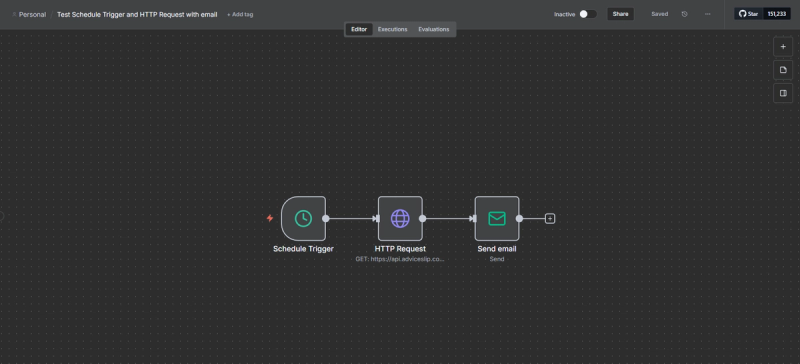
A basic workflow: it runs at a set time, calls an API and emails the result.
When a step needs custom logic, you write JavaScript or Python inside the workflow. For everything else, configuring nodes in the editor is enough.
n8n integrations
n8n has hundreds of ready-made integrations for services such as Google Sheets, Gmail, Slack, HubSpot, Notion and SQL databases. You can browse the full catalog in the n8n integrations directory.
If an app has no dedicated node but offers an API, you connect it with the HTTP Request node. That lets you bring almost any system with an API into a workflow.
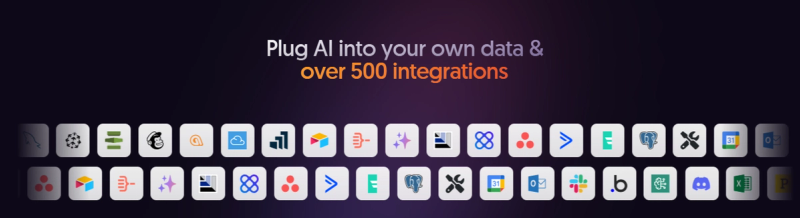
n8n connects to hundreds of apps and to any service with an API.
n8n and artificial intelligence
n8n includes nodes for working with language models from providers such as OpenAI, Anthropic and Google, and for building AI agents inside a workflow. An agent in n8n can receive a message, decide which tool to use (search a database, call an API, save a record) and reply with the result.
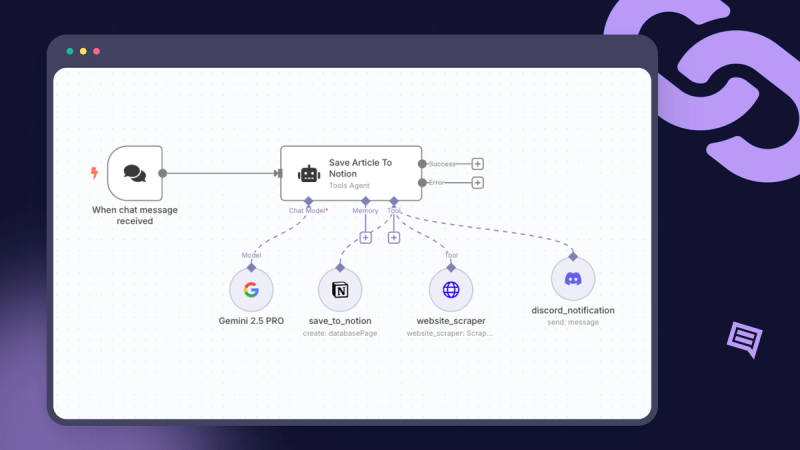
An AI agent in n8n: it receives a message, uses tools and saves the result in another app.
Teams use this to sort emails or tickets, summarize documents, answer common questions with company information or fill in missing CRM data. If you want more than an automation and need an assistant that works inside your systems, see how we design AI agents for business.
n8n with WhatsApp
n8n has a WhatsApp Business Cloud node for sending messages and templates and handling media, plus a WhatsApp trigger that starts a workflow when a message arrives. You can use them to answer common questions, send order confirmations or hand a conversation over to someone on your team.
You need a Meta WhatsApp Business Platform account, a verified phone number and API credentials. Messages you start outside an active conversation must use templates approved by Meta. The details are in the WhatsApp node documentation.
How much n8n costs
You can run n8n in two ways, with different costs:
- On your own server (Community Edition): you pay no license fee to use it inside your company. You do pay for the server and for the time of whoever installs, updates and backs it up.
- n8n Cloud: n8n hosts it for you and charges by monthly executions. Every plan includes unlimited users and workflows.
| Plan | Price (billed annually) | Executions per month | Where it runs |
| Starter | €20 per month | 2,500 | n8n cloud |
| Pro | €50 per month | 10,000 | n8n cloud |
| Business | €667 per month | 40,000 | Your server |
| Enterprise | Custom quote | Custom | Cloud or your server |
Prices as listed on the n8n pricing page in November 2026, billed annually. They may change, so check them before you decide. The Starter and Pro plans include a free trial with no credit card.
To choose, compare the cloud plan with what it costs you to run your own server. With a few workflows, the cloud is usually simpler. With many workflows, sensitive data or a need for full control, self-hosting usually pays off.
Is n8n open source?
Not in the strict sense. n8n's source code is public, but it uses the Sustainable Use License, which n8n calls fair-code. You can use and modify it for your company's internal processes or for personal use, but you cannot sell it or offer it as a service to others. If you plan to include n8n in a product you charge customers for, read the license in the n8n repository or contact n8n.
How to install n8n
You have four options, from least to most technical:
- n8n Cloud: create an account and start building workflows. Nothing to install.
- One-line install: an official script that sets up n8n on a Linux or macOS server with Docker.
- Docker Compose: the option n8n recommends for production, since it runs n8n together with its database and other services.
- npm: installs n8n with Node.js. n8n is phasing it out from version 3.0 and suggests Docker Compose or the one-line install.
You'll find guides for each option in the n8n hosting documentation. If you self-host, plan from day one for a domain with HTTPS, database backups, someone in charge of updates and someone who checks workflows when something fails.
n8n vs Zapier vs Make
| n8n | Zapier | Make | |
| Where it runs | n8n cloud or your server | Cloud only | Cloud only |
| How it charges | Per full workflow execution | Per task (each step run) | Per operation or credit |
| Custom code | JavaScript and Python inside the workflow | Code steps, with limits | Code modules, with limits |
| Ready-made integrations | Hundreds, plus any API | The largest catalog | Thousands |
Zapier fits when you want to connect popular apps quickly without a server. Make offers a visual editor with more control than Zapier. n8n stands out when you need complex logic, AI workflows, high execution volumes or to keep data on your own infrastructure.
Best practices for getting started with n8n
- Start with a simple process: pick a repetitive, low-risk task, like a weekly report, before automating anything critical.
- Handle errors: decide what happens when a step fails and who gets notified.
- Reuse: split repeated parts, such as sending a notification or logging a record, into sub-workflows.
- Document: give nodes clear names and note what each workflow does, so someone else on your team can maintain it.
- Start from a template: browse the n8n community template library before building from scratch.
n8n FAQ
Is n8n free?
The Community Edition, installed on your server, has no license fee for internal company use. You pay for the server and its upkeep. n8n Cloud is paid, starting at €20 per month billed annually, and comes with a free trial.
Do I need to know how to code to use n8n?
Not for simple workflows: you build them by connecting nodes in the visual editor. For custom logic, integrations without a dedicated node or a self-hosted setup, it helps to have someone technical.
Can n8n work with WhatsApp?
Yes. n8n has a WhatsApp Business Cloud node and a trigger for incoming messages. You need a Meta WhatsApp Business Platform account.
What is the difference between n8n and an AI agent?
n8n is the platform where you build the automation. An AI agent is a type of workflow that uses a language model to decide which steps to take. You can build AI agents inside n8n.
When to get help implementing n8n
If you want to automate processes that touch customers, payments or sensitive data, or you need n8n on your own infrastructure with backups and monitoring, it pays to have someone experienced design the workflows with you. At Bakslash we build n8n automations and AI agents for businesses, from the first workflow to ongoing maintenance.