What Is an AI Agent? How It Works and Examples

Bakslash editorial
November 6, 2026
Comparte este artículo
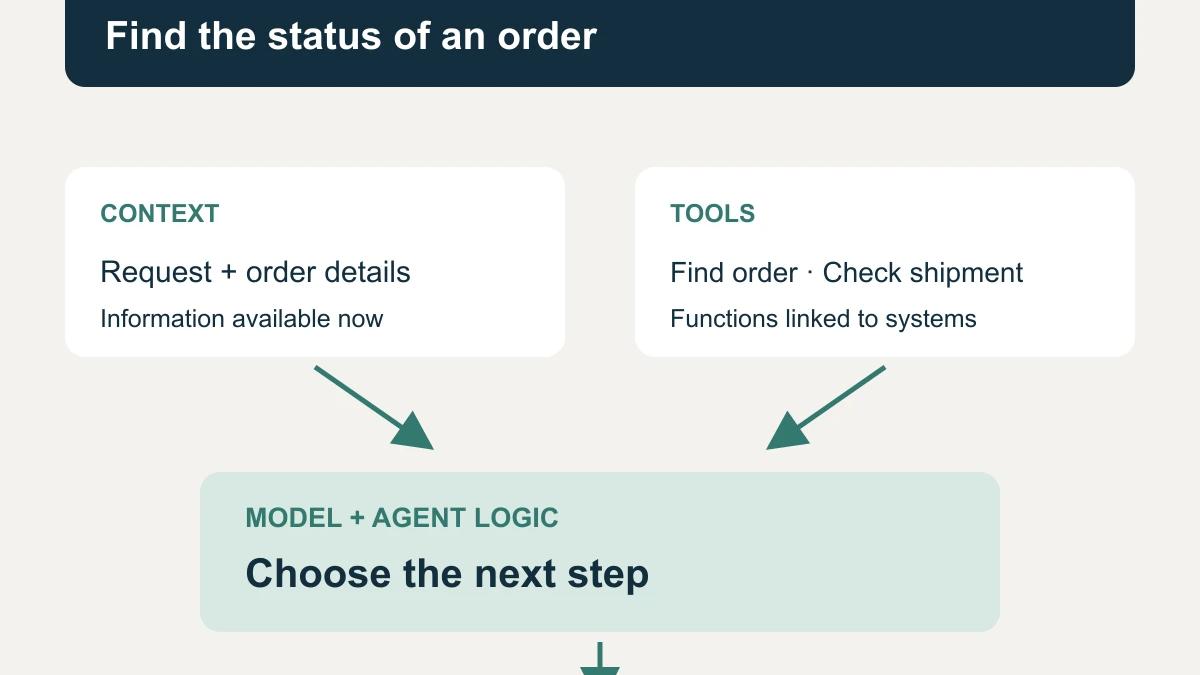
An AI agent is a software system that uses artificial intelligence to choose and carry out actions toward a goal. It can retrieve information, use tools, and adjust its next step based on the results, within configured permissions and limits. For example, an agent can find an order, check its shipment, and prepare a reply using that status.
How does an AI agent work?
In a language-model-based agent, the model interprets the request and proposes what to do. The application connects tools, checks permissions, and runs operations. The AI agent is the complete system, rather than just the model writing a reply.
Imagine a customer asking about an order that has not arrived. The system needs to identify the order, find out what happened, and determine whether it can answer or needs more information.
Goal: what it needs to resolve
The goal defines the intended outcome: "Find the order status and explain the next step to the customer." You also need a stopping condition, such as finding a confirmed status or discovering that the order identifier is missing.
"Handle customer service" leaves too much undefined. A bounded goal lets you distinguish a useful answer from a task that still needs information.
Tools: how it retrieves information or acts
Tools are functions the application makes available to the agent. They might find orders, check a calendar, retrieve documents, or create a record. To use one, the model requests an operation with parameters, and the application returns its result.
Typing "check the shipment" does not connect the carrier's system. Your team needs to implement that integration. A model's statement that it updated an order is also insufficient: you need the response from the system that received the operation.
Context and memory: what information it uses
Context is the information available for the current decision: the request, instructions, retrieved data, and tool results. In the order example, it includes the order number and the status returned by the store.
Memory can retain information across steps or sessions when the application provides that storage. Not every agent needs persistent memory. Retrieving a conversation history or saving a preference does not mean the model has been retrained.
Incomplete or outdated history can lead to a wrong decision. Storing more information does not guarantee a better answer.
Decision-making: which step comes next
The model can choose to call a tool, ask for a detail, prepare a reply, or stop. If an order has shipped, it might check tracking. If it finds no matching order, it might ask for the correct identifier.
Here, "deciding" means selecting an action using instructions, available information, and capabilities. It does not imply consciousness or human understanding.
Action loop: retrieve, observe, and adjust
An illustrative journey for the order inquiry looks like this:
- Receive the question and identify the goal.
- Find the order using an authorized tool.
- Read the result and check shipping if appropriate.
- Assess whether the information supports an answer or whether a detail is missing.
- Explain the status, request information, or hand the case to a person.
The system can repeat part of the journey after receiving new information. Configure stopping conditions and limits so it does not keep making calls without resolving the task. Microsoft describes tool use and loops in its guide to AI agent architecture patterns.
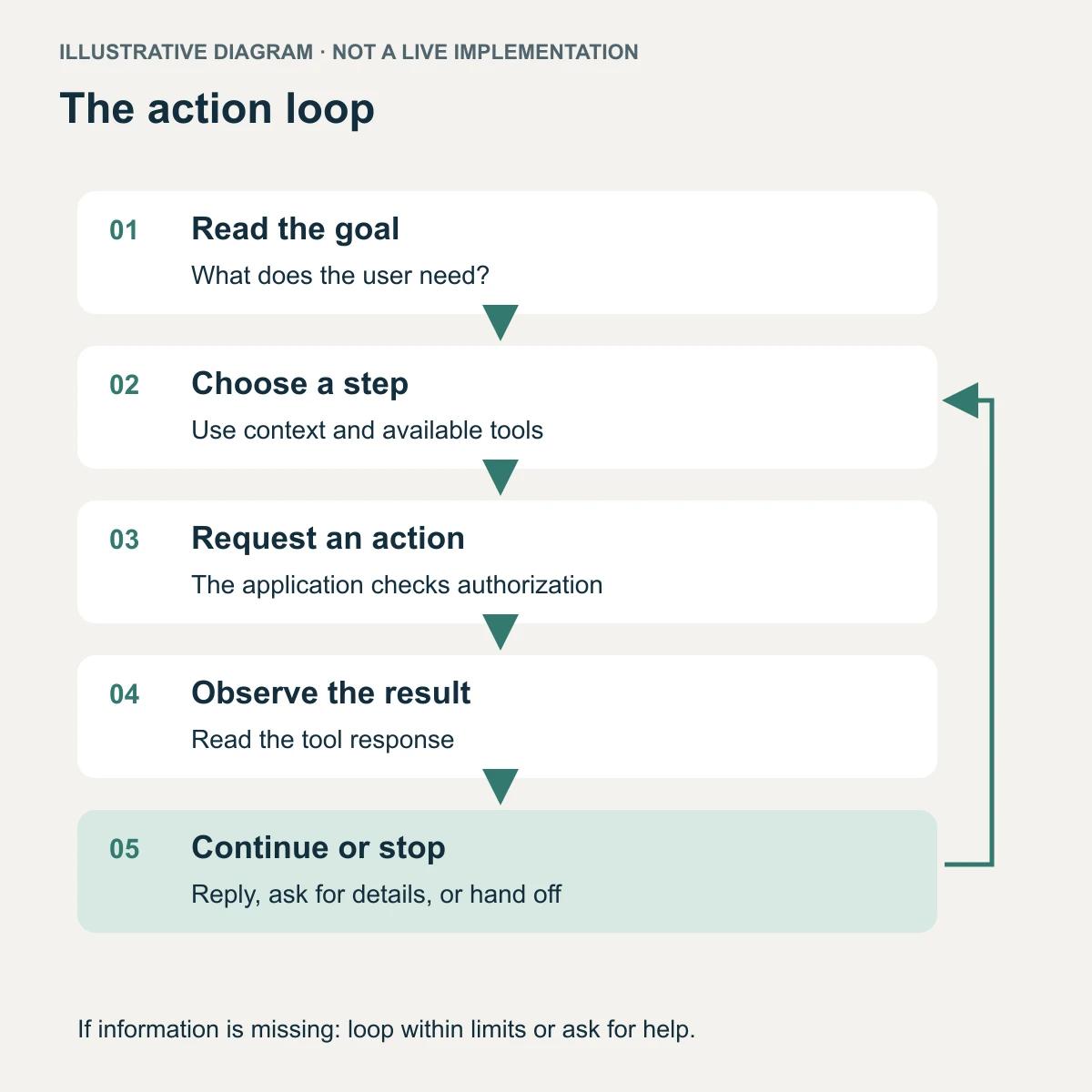
Illustrative flow: the agent can choose another step, ask for details, or hand off; the application limits and authorizes operations.
How is an AI agent different from a chatbot or traditional automation?
A chatbot describes a way to interact with software through conversation. Traditional automation runs steps someone has defined. With an agent, you delegate part of the next-step selection to the model.
| Aspect | Answer-based chatbot | Traditional automation | AI agent |
| Starting point | A question or message | A trigger or rule | A goal or request |
| Path | Answers using available content | Follows predefined steps and conditions | Selects steps using context and results |
| Tools | May not have tools | Uses programmed integrations | Can choose among enabled tools |
| Example | Explain a returns policy | Copy a submitted form to a CRM | Find an order and check shipping before replying |
| Common limitation | Cannot verify live status without a connection | Needs rules for expected cases | Can choose the wrong step or misread a result |
These categories overlap. You can talk to an agent through a chatbot, and the agent can use fixed automations for parts of its work. You can also include AI in a predefined sequence without letting it control the path.
Anthropic uses the distinction between predefined paths and model-directed steps in its explanation of workflows and agents. A rule-based integration may be sufficient for copying form fields into another system.
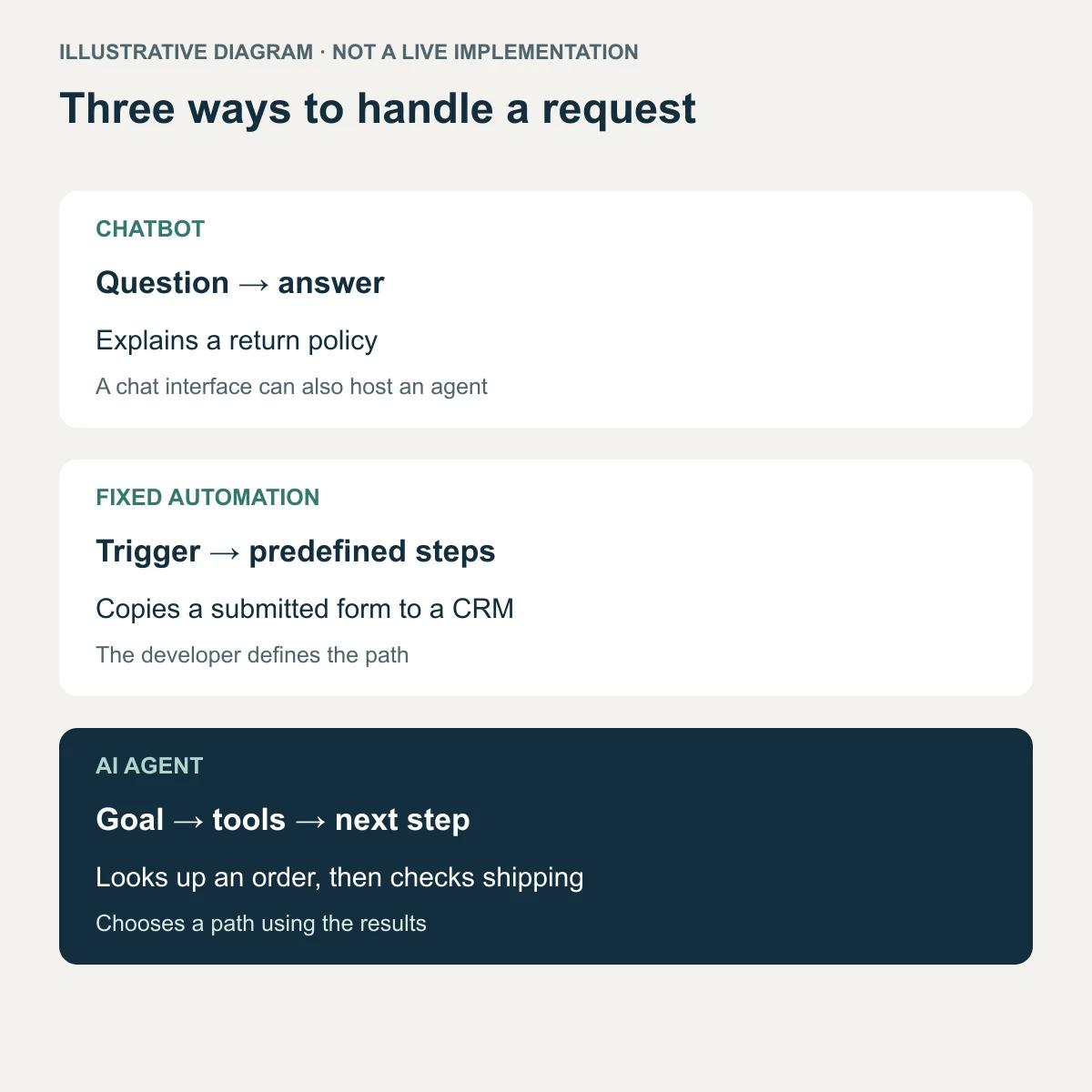
Illustrative diagram: a chat interface can also host an agent; these categories can overlap.
What is agentic AI?
Agentic AI is an approach to building systems that use AI to pursue goals through actions and successive adjustments. The term describes how you organize the work. It does not identify one product or require multiple agents.
Consider an inquiry about a shipment. In an agentic system, you can let the agent choose what to look up based on what it finds. The path can change if the order does not exist, the carrier has no information, or the customer needs to clarify a detail.
Autonomy has different scopes. An agent might prepare a reply for a person to review, or perform an authorized operation. Calling it an "autonomous AI agent" does not mean it should act without limits, access every system, or operate without oversight.
What types of AI agents might a business use?
For this introduction, we group AI agents by business role. This is a practical classification, rather than a universal list of architectures. The examples are hypothetical and do not represent customer implementations or measured results.
Customer service: check an order's status
A customer asks about a purchase. The agent finds the order and checks tracking when the available information calls for it. It then prepares an explanation or asks for a missing detail.
The agentic behavior is choosing the lookups for the case. Displaying a fixed answer about delivery times does not require that process.
Sales: respond to a product inquiry
A prospect asks whether a product fits their needs. The agent checks the catalog and current terms, identifies what it needs to clarify, and prepares a reply with relevant options.
Availability and prices need to come from an authorized system. The agent should not fill missing details with invented offers.
Operations: investigate a delivery discrepancy
Your team receives an alert about an incomplete delivery. The agent gathers the order and receiving record, identifies missing information, and prepares an incident summary.
The intended output might be an explanation with supporting documents. Changing inventory or issuing compensation are separate actions that require their own authorization.
Data analysis: answer a business question
A manager asks which products had returns during a specified period. The agent interprets the request, queries an authorized source, and prepares an explanation of the results.
It needs to preserve the date range, filters, and data source. Finding an association between variables does not establish that one caused the other.
Internal assistants: find a procedure
An employee asks how to submit an expense reimbursement. The agent searches documents that employee can access, identifies the material that answers the question, and presents the steps with links to its sources.
If it finds conflicting versions, it can flag the discrepancy and request a review. Internal document search needs to respect the user's access permissions.
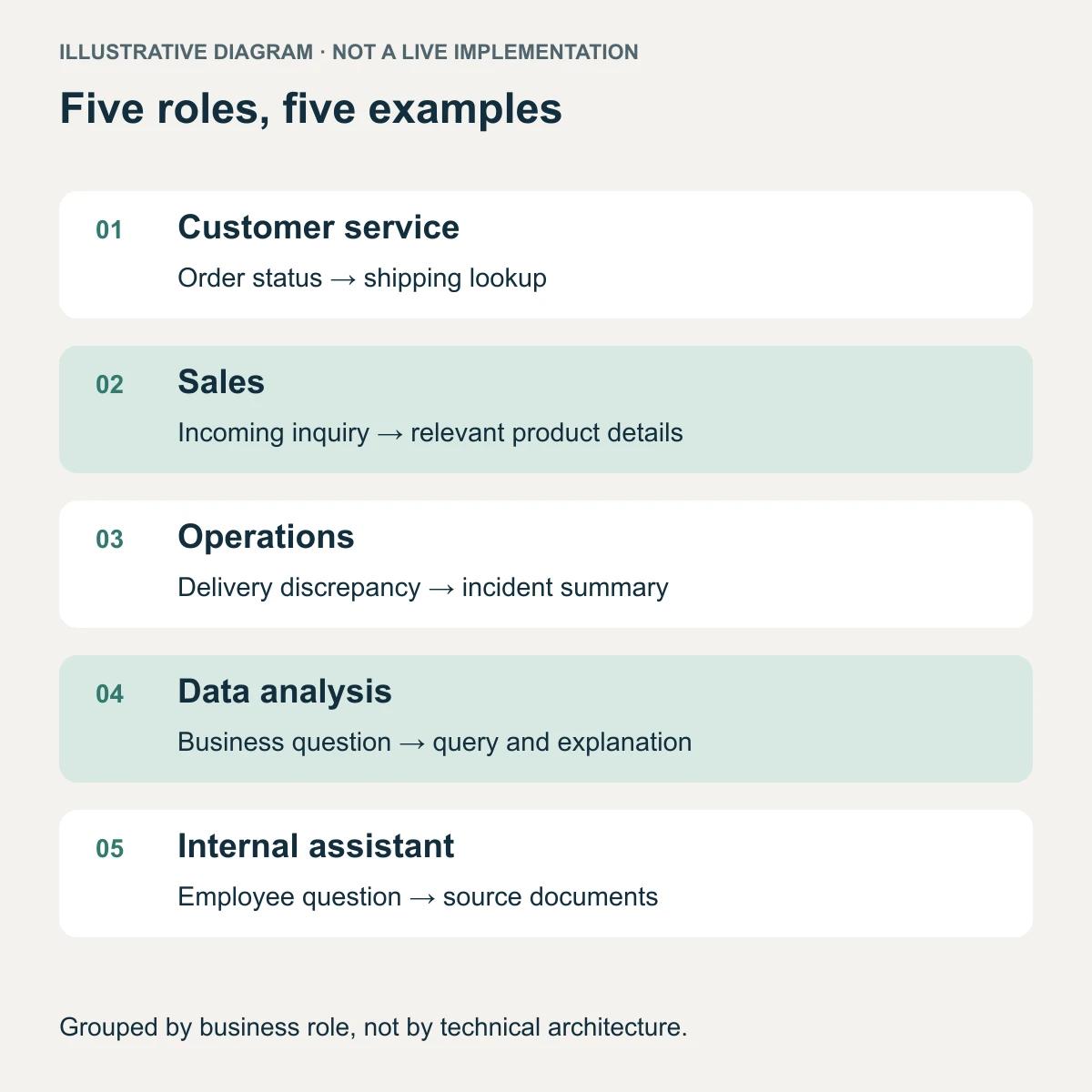
Hypothetical examples grouped by business role rather than technical architecture. They do not represent customer results.
What limitations and risks should you understand?
An agent can misinterpret a request, use outdated information, or claim that a failed action succeeded. It can also encounter malicious instructions inside documents or messages it retrieves.
Limit tools and data to the task's scope, and enforce authorization in connected systems. Avoid adding credentials or sensitive data the agent does not need, and define what you retain and who can access it. Keep human approval before sensitive actions. OWASP describes these risks in its guidance on excessive agency.
This article explains the concept. For delegation, permission levels, and result review, read AI Agents for Business: What to Delegate and Review. To explore implementation scope, see Bakslash's AI agent service.
AI agent FAQs
Are all AI agents chatbots?
No. An agent can work behind a conversation, respond to an event, or run inside an application. A chatbot is an interface; the agent is the system that selects actions toward a goal.
Does an agent need multiple models or multiple agents?
No. You can build an agent with one model and tools. Multi-agent systems are another architecture option; coordinating more components also introduces work and potential failures.
Does an AI agent learn from every conversation?
Not by default. Retaining history or retrieving documents adds context, but it does not train the model. Lasting changes depend on how your team manages memory, instructions, and updates.
Can an AI agent work without internet access?
That depends on its architecture. You can connect an agent to internal documents and systems without giving it open web browsing. If its model or a tool uses a remote service, it will need connectivity to that service.
When is traditional automation enough?
When you know the process steps and conditions, you can handle the task with rules. Copying a validated form into a CRM is one example. Consider an agent when you need to select actions using variable information and can verify the outcome.