What Are Theme Builders 2026

Bakslash editorial
August 20, 2026
Comparte este artículo
What is a Theme Builder in WordPress and which one should you use?
Complete guide to WordPress Builders, Gutenberg, and modern themes
If you're building or maintaining a website in WordPress, you've likely encountered terms like WordPress builder, theme builder, Gutenberg, Elementor, Divi, Bricks, or GeneratePress.
For many people—clients, entrepreneurs, or non-technical teams—these concepts often blend together, creating confusion and, in many cases, poor technical decisions that impact site performance, SEO, and long-term maintenance.
Understanding correctly what each tool does and when to use it is key to building a solid, scalable WordPress site ready to grow.
What is a WordPress Builder?
A WordPress builder is a tool that allows you to create pages and visual structures within WordPress without writing code directly.
Instead of working with HTML5, CSS, or PHP, the builder offers a visual interface based on blocks, sections, and styling controls that let you build content while seeing the result in real time.
Common features of a WordPress builder
- Visual editing
- Block or module system
- Drag-and-drop capability
- Typography, color, and spacing controls
- Saving reusable components
Examples of popular WordPress builders
- Gutenberg (native editor)
- Elementor
- Divi
- Bricks
All of them are builders, but not all serve the same purpose or are designed for the same type of project.
What is a Theme Builder?
A theme builder is an evolution of the traditional builder concept.
While a classic builder focuses mainly on designing individual pages, a theme builder allows you to design and control the overall structure of the website.
What you can build with a theme builder
- Header
- Footer
- Blog post templates
- Page templates
- Product templates in WooCommerce
- Archive pages (categories, tags, author)
- Conditional layouts based on content type or user
In simple terms:
- A page builder designs pages
- A theme builder designs the complete site system
This is especially important in projects that require visual consistency, scalability, and long-term control.
What is Gutenberg?
Gutenberg is the native block editor for WordPress, officially integrated since WordPress 5.0.
It works through a block system that represents different content elements.
Types of blocks in Gutenberg
- Text and headings
- Images and galleries
- Columns and groups
- Buttons
- Embeds (YouTube, maps, social media)
- Reusable blocks
- Design patterns
Is Gutenberg a WordPress builder?
Yes. Gutenberg is a native WordPress builder, though with a different philosophy than visual builders like Elementor or Divi.
Its approach prioritizes:
- Performance
- Clean code
- Future compatibility
- Editorial experience
Advantages of Gutenberg
- Maximum compatibility with WordPress
- Excellent performance
- Cleaner code
- Ideal for SEO
- Less dependence on external plugins
Limitations of Gutenberg
- Less visual for non-technical users
- Advanced design requires more planning
- Sometimes needs additional blocks for complex layouts
Full Site Editing (FSE) and the future of Gutenberg
With the arrival of Full Site Editing (FSE), Gutenberg stopped being just a content editor and became a theme builder as well.
What Full Site Editing allows
- Edit header and footer visually
- Create complete site templates
- Design archive pages
- Define global styles
- Use reusable patterns across the site
Themes compatible with FSE are known as block themes and represent the official direction of WordPress going forward.
WordPress themes: what they are and how they work
A WordPress theme defines the visual and structural foundation of your website.
It is responsible for:
- Global styles
- Typefaces
- Colors
- Base layout
- Templates by content type
Most common types of WordPress themes
Traditional themes
These are classic themes that use PHP templates and rely on the Customizer or blocks.
Examples:
- GeneratePress
- Astra
- Twenty Twenty-One
These themes stand out for their stability, performance, and compatibility with Gutenberg.
Themes with integrated builder
These are themes that incorporate their own builder as the core design element.
Examples:
- Divi Theme
- Hello + Elementor Pro
In this approach, site design depends almost entirely on the builder.
Full Site Editing themes (Block Themes)
These are modern themes designed specifically to work with Gutenberg and the full site editor.
Examples:
- Twenty Twenty-Four
- Custom block themes
They allow you to control almost everything on the site from the visual editor.
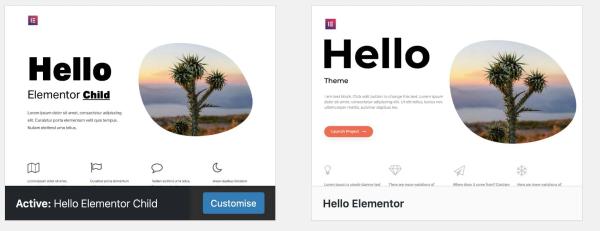
What is a Child Theme?
I need a child theme
A child theme is a theme that inherits the functionality of a parent theme, also known as a parent theme.
What a child theme is used for
- Customize a theme without modifying the original
- Avoid losing changes when updating the parent theme
- Add custom CSS
- Modify templates
- Inject custom logic in functions
Is using child themes still necessary today?
It depends on your project's stack and approach.
Table 1 — When to use a Child Theme in WordPress
| Scenario | Do you need a Child Theme? | Reason |
| Using Gutenberg + block theme (FSE) | No | Styles and templates are managed from the site editor without touching theme files |
| Using Gutenberg + GeneratePress | Optional | Most customizations are done with blocks, additional CSS, or theme hooks |
| Using Bricks Builder | No | Bricks acts as a complete theme builder and doesn't require a child theme |
| Using Elementor + Hello Theme | No | The design lives in Elementor, not in the theme |
| Using Divi Theme | Sacrifices performance | Divi already concentrates logic and design; child theme is typically used only for hacks |
| Adding just custom CSS | No | CSS can be added from the Customizer or builder |
| Modifying theme's PHP templates | Yes | To avoid losing changes on updates |
| Adding custom PHP functions | Yes | Keeps code separate from the parent theme |
| WooCommerce e-commerce with template overrides | Yes | WooCommerce recommends using child theme to override templates |
With modern builders and block themes, many customizations no longer require a child theme.
Main WordPress Builders in the market
Main theme builder options
Gutenberg
Focus: content, performance, and WordPress's future.
- Ideal for blogs and educational sites
- Excellent for SEO
- Recommended for long-term projects
Elementor
Focus: quick visual design.
- Very intuitive
- Large ecosystem of plugins
- Popular for marketing and landing pages
Its main drawback is the impact on performance if not optimized correctly.
Divi
Focus: all-in-one visual.
- Very flexible visually
- Widely used in traditional agencies
However, it often generates heavy code and greater theme dependence.
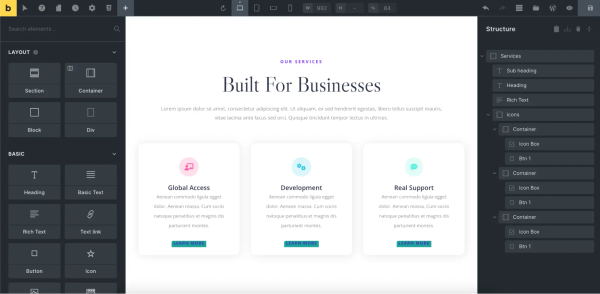
Bricks Builder
Focus: performance and complete control.
- True theme builder
- Excellent performance
- Ideal for developers and advanced projects
It has a steeper learning curve but offers great scalability.
GeneratePress
Focus: lightness and stability.
- Ultra lightweight
- Well integrated with Gutenberg
- Excellent for SEO and performance
It's not a complete visual builder, but a solid foundation for building with blocks.
General comparison of WordPress builders
Table 2 — Simplified general comparison of WordPress Builders
| Builder/Theme | Type | Focus | Performance | Ideal for |
| Gutenberg | WordPress Builder (native) | Content, blocks, and SEO | Very high | Blogs, educational sites, long-term projects |
| Gutenberg + FSE | Theme Builder (native) | Complete site design | Very high | Modern, scalable, and future-proof sites |
| GeneratePress | Lightweight theme | Stable base + performance | Very high | Blogs, optimized e-commerce, corporate sites |
| Elementor | Page Builder | Quick visual design | Medium-low | Landing pages, marketing, prototypes |
| Divi | Theme + Builder | All-in-one visual design | Medium-low | Traditional agencies, visual projects |
| Bricks Builder | Theme Builder | Performance + technical control | Very high | E-commerce, complex projects, dev-friendly |
Which WordPress builder should you use for your project?
bricks editing interface
Educational blogs and content sites
Gutenberg paired with a lightweight theme like GeneratePress is usually the best option.
- Better speed
- Better SEO
- Simple maintenance
- Clear editorial focus
E-commerce with WooCommerce
In online stores, performance is critical.
Recommended options:
- Bricks
- GeneratePress + Gutenberg
They allow complete control of layouts without sacrificing speed.
Landing pages and marketing campaigns
For projects where time-to-market is key, Elementor can be a valid option if used with good optimization practices.
Long-term projects and scalable platforms
For systems that will grow over time:
- Bricks
- Gutenberg with Full Site Editing
They offer less technical debt and better long-term maintenance.
Common mistakes when choosing a WordPress builder
- Choosing based only on visuals
- Not considering performance
- Using too many design plugins
- Not thinking about future maintenance
- Ignoring the impact on SEO
Conclusion
There's no single "best builder" for every case.
There is the right builder for your project type, goals, and growth horizon.
If your priority is:
- Performance
- SEO
- Scalability
- Long-term maintenance
Modern solutions like Gutenberg, GeneratePress, and Bricks are usually more solid than traditional visual builders.
A good WordPress site isn't measured only by how good it looks in the editor, but by how fast it loads, how easy it is to maintain, and how well it scales over time.
Sources and references
WordPress and Gutenberg
- https://wordpress.org/documentation/article/wordpress-block-editor/
- https://wordpress.org/documentation/article/site-editor/
- https://developer.wordpress.org/themes/
- https://developer.wordpress.org/themes/block-themes/
Child Themes
GeneratePress
Bricks Builder
Elementor
SEO and performance
- https://developers.google.com/search/docs/fundamentals/seo-starter-guide
- https://web.dev/vitals/
- https://web.dev/optimize-wordpress/
Looking to build or improve a site on WordPress or WooCommerce without compromising performance, SEO, or scalability?
At Bakslash, we have real experience on content projects, e-commerce, and digital platforms, tailoring the stack—builders, themes, and architecture—to the specific use case of each business.
Get in touch and we'll help you define the best combination of WordPress, WooCommerce, and builder for your project, avoiding extra costs, rework, and maintenance issues down the line.